Using it from Docker
Create a repository with a format of docker. The format is fixed once the repository exists,
because nothing migrates between formats.
Unlike the other formats there is no /repository/ URL to point a client at. A Docker client builds
its own URLs from the image reference, so the registry is the bare host and the repository name is
the first segment of the image:
docker pull repo.example.com/docker-hosted/team/api:1.4.0
That reaches the team/api image of the docker-hosted repository. One host serves every
repository this way, with no extra port and no hostname of its own.
Signing in
docker login repo.example.com --username you@example.com
Use an API token from your account page as the password. Your account password works too, but a token can be revoked on its own.
A public repository needs no credentials to pull. Pushing always does.
Pushing
docker tag your-image:1.4.0 repo.example.com/docker-hosted/team/api:1.4.0
docker push repo.example.com/docker-hosted/team/api:1.4.0
Multi-platform images work as they are: docker buildx build --push sends an index and one manifest
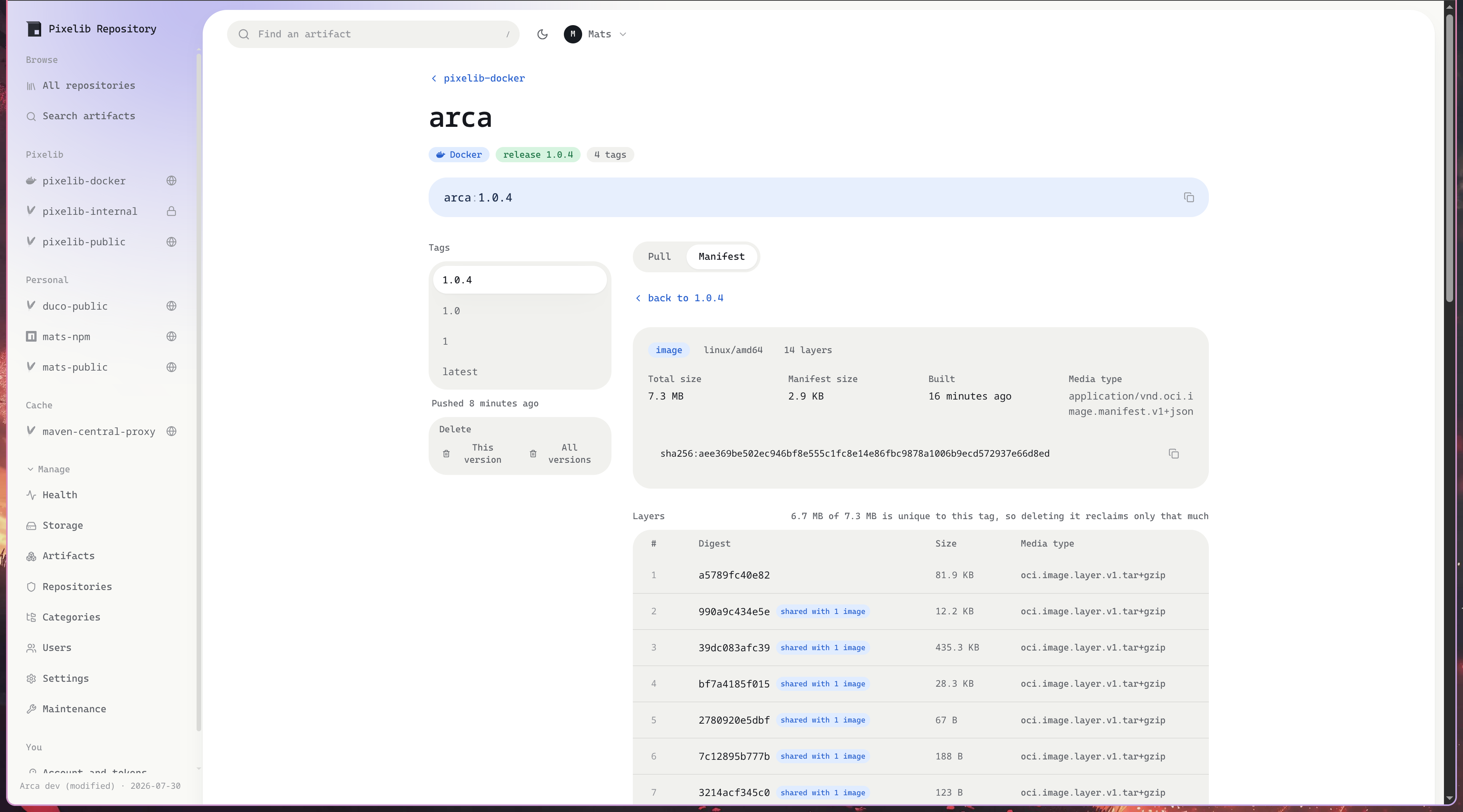
per platform, and the repository page shows the platform matrix.
Pulling
docker pull repo.example.com/docker-hosted/team/api:1.4.0
docker pull repo.example.com/docker-hosted/team/api@sha256:6c6e1260a377...
A tag can be moved to another image. Pulling by digest is the only reference that always resolves to the same bytes, which is what to pin in a deployment.
In a Dockerfile or a compose file:
FROM repo.example.com/docker-hosted/team/api:1.4.0
services:
  app:
    image: repo.example.com/docker-hosted/team/api:1.4.0
Dropping the repository prefix
Set a default docker repository under Manage, Settings and a bare reference resolves against it:
docker pull repo.example.com/team/api:1.4.0
The leading segment still wins when it names a docker repository, so both forms keep working. This is what makes a single-repository install read the way Docker Hub does.
Tags and policy
A tag is a version, so a repository’s release or prerelease policy applies to it. Docker tags carry
arbitrary suffixes, though: 1.25-alpine names a variant and 0.1.9-swaggerui-staging names
whatever its author meant. Only a known marker (rc, alpha, beta, dev, pre, snapshot,
nightly, edge) counts as a prerelease, and everything else is a release. A mixed policy is
the honest default for that reason.
Moving a tag is ordinary Docker practice, so a docker repository allows it by default. Turn off Allow tags to be moved to make every tag here permanent, and a push over an existing one answers 409.
Proxying another registry
Create a repository with a type of proxy and a remote URL:
| Registry | Remote URL |
|---|---|
| Docker Hub | https://registry-1.docker.io |
| GitHub Container Registry | https://ghcr.io |
| Quay | https://quay.io |
| Google Artifact Registry | https://<region>-docker.pkg.dev |
Pull through it and each image is fetched once, then served from here. Docker Hub’s official images
live under an implicit library/ scope, which is applied for you: docker pull
repo.example.com/hub/nginx resolves library/nginx upstream.
Registries that require credentials use a token service rather than accepting them directly. Set the remote username and password and the exchange is handled for you. Credentials are only ever sent to an HTTPS token service.
A proxy caches a tag for its metadata TTL, because upstream can move it, and caches everything content-addressed for ever, because a digest names one document for all time. Set a cache retention in days to evict what nothing has pulled recently.
Reclaiming storage
Deleting a tag does not free its layers. That is deliberate: layers are shared, so any other tag may still need them. The artifact page says how much of a tag is unique to it for exactly this reason.
Manage, Maintenance has a Reclaim docker storage action that removes layers and untagged manifests no tag can reach any more. Check first and it reports what would go without touching anything. It also runs on its own every few hours.
Proxy repositories are left alone by it: their content is refetchable and ages out by last access instead, through the cache retention setting.
Large layers
The artifact upload limit does not apply to container layers, which are routinely larger than any
sane ceiling for a jar. Set --max-blob or MAX_BLOB_BYTES to cap them; the default is no limit.
What is not supported
- Schema 1 manifests. Deprecated for years and rejected on push. Anything built this decade sends schema 2 or OCI.
- Manifest conversion. A manifest is served as the type it was pushed with, because re-encoding it would change the digest it is addressed by. Every current client accepts both encodings.
- The referrers API. Signatures and SBOMs attached with
cosign attachordocker buildx --attestare stored and served, since they are ordinary manifests, but they are not discoverable through/v2/<name>/referrers/. Clients fall back to the tag scheme, which works. - Docker groups. One URL over several repositories is not implemented yet.