Managing an installation
Everything on this page lives under Manage in the sidebar, and needs an administrator account.
Repositories
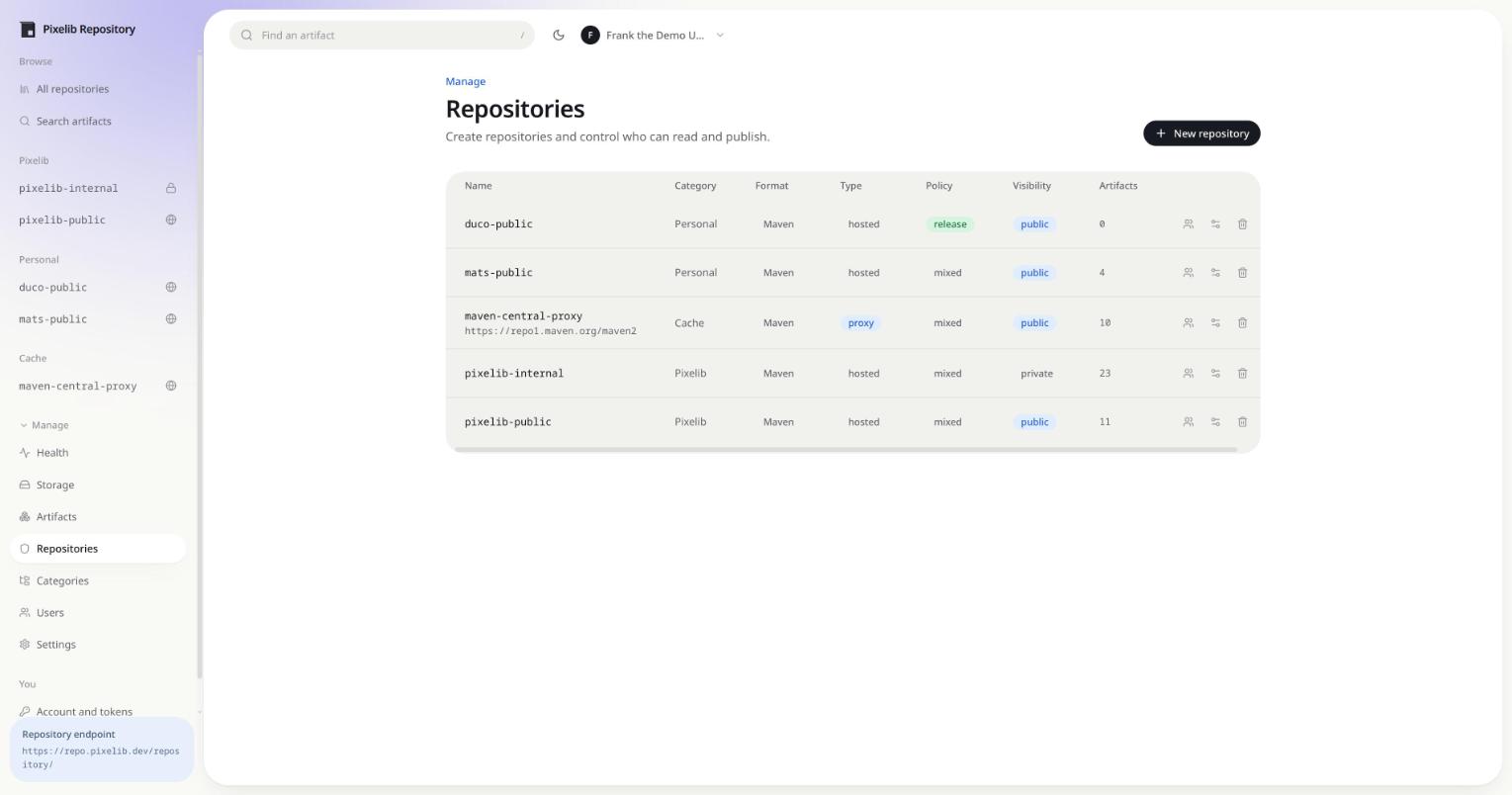
Creating a repository asks for four things that cannot all be changed later:
- Format, Maven 2 or npm. Fixed once the repository exists, because nothing migrates between formats.
- Type, hosted or proxy. A proxy needs a remote URL and is read only.
- Policy, releases only, prereleases only, or mixed. Changing it later does not remove versions that no longer fit, it only rejects new ones.
- Visibility, public or private. Public repositories are readable without an account.
allowRedeploy lets a hosted Maven repository overwrite an existing release. It is off by default,
and it does not apply to npm, where a published version is always immutable.
Renaming a repository
The name is editable in the settings dialog. Renaming does not move anything on disk: artifacts are stored against the repository’s identifier, so the rename is one column and a redirect.
The old name is kept, and everything that still asks for it is answered with a redirect to the new one:
GET /repository/internal/dev/pixelib/app/39/app-39.jar
301 Moved Permanently
Location: /repository/pixelib-internal/dev/pixelib/app/39/app-39.jar
A read gets a 301. A publish gets a 308, which is the one redirect that keeps the method and the
body rather than turning an upload into a GET. Maven, Gradle and npm all follow both, so a build
pointed at the old URL keeps working while you update it. Docker is the exception: a client builds
every URL of a pull or a push from the reference it was given, so a former name resolves in place
there instead of redirecting.
Renaming also carries the name across everything that referred to it: p2 group members that listed the repository as a child, and the default Docker repository if it was this one.
Former names are listed under the name in the Repositories table and in the settings dialog, where each can be removed to free it. A former name stops redirecting the moment another repository claims it. The new repository owns the name outright; the redirect is not shadowing it and does not come back if that repository is later deleted.
Old names live only as redirects. Nothing prunes them, so a repository that has been renamed a few times keeps answering to every name it ever had until you remove them.
Deployment links
A deployment link is a fixed URL that downloads one file from the newest version of an artifact, without authentication, whatever the repository’s visibility. It is how a private repository publishes exactly one file to something that has no credentials: an installer, a server that pulls its own plugins, a CI job in someone else’s account.
The problem it solves is that the filename carries the version:
/repository/pixelib-internal/dev/pixelib/pixelscript/pixelscript-paper/39/pixelscript-paper-39.jar
That URL breaks on the next release. A link names the artifact and a pattern instead, and resolves the file on every request:
https://repo.example.com/download/pixelscript-paper-latest
Links are managed per repository, from the link icon in the Repositories table or the Links tab on the repository page. A link is:
| Field | What it does |
|---|---|
| Group ID and Artifact ID | the artifact to track, as the repository’s format names it |
| Pattern | which file of a version to serve |
| Match | how to read the pattern, as a template or a regular expression |
| Resolves to | releases, prereleases, or the latest of either |
| Slug | the last segment of the URL, unique across the instance; left empty, a random one is minted |
| Download as | serve the file under a fixed name instead of the published one |
A template is literal text with {version}, {baseVersion}, {name} and {namespace} filled in,
plus * for anything else that varies. {name}-{version}.jar is the usual one. For anything a
template cannot say, switch to a regular expression: it is matched against the whole filename, and
placeholders are substituted into it quoted, so a version containing . or + cannot widen what
the link matches.
Resolution walks versions newest first and serves the first file that matches. It does not stop at the newest version, so a release that shipped without the file the link names does not break the link: it keeps serving the newest release that has one.
The listing shows what each link currently resolves to, so a pattern that matches nothing is
visible before someone follows it rather than after. A link can be disabled, which answers 404
without giving the URL up, and downloads through it are counted.
The slug is the credential. It is the whole address, so treat it the way you would treat a token:
anyone holding it can download that file, and nothing else about the repository is reachable
through it. Leaving the slug empty mints a random one for that reason; a slug you choose yourself
is only as secret as it is hard to guess, and a link into a private repository deserves a secret
one. A disabled link, a link that resolves to nothing yet and a slug that never existed all answer
the same 404.
Proxy repositories
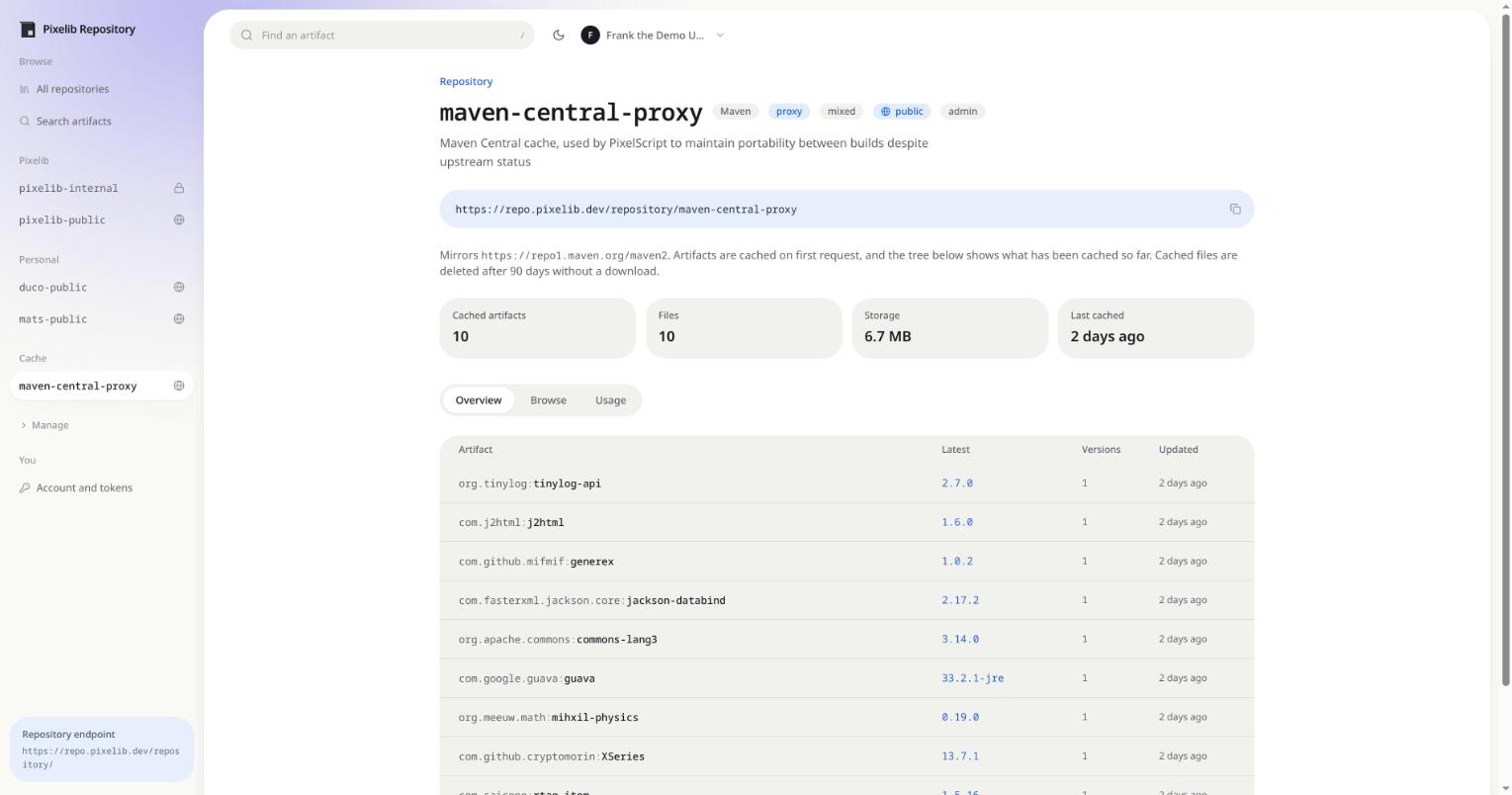
A proxy mirrors a remote and caches what it serves. The first request for a path fetches it, stores it like any other artifact, and serves it from disk after that.
Three timers control the cache:
| Setting | Applies to |
|---|---|
metadataTtlSeconds |
maven-metadata.xml, non timestamped snapshots and npm packuments |
negativeTtlSeconds |
paths the remote does not have |
cacheRetentionDays |
eviction of files nobody has downloaded |
The negative cache matters more than it sounds. Maven and Gradle ask for large numbers of
-sources.jar, -javadoc.jar and parent POMs that were never published, and without it every build
re-asks the remote for all of them.
Released artifacts and timestamped snapshot builds are cached until evicted, because Maven treats
them as immutable. When a cached path expires the next request revalidates with If-None-Match and
If-Modified-Since, so an unchanged file costs a 304 rather than a download. If the remote is
unreachable, the stale copy is served instead of an error.
Set cacheRetentionDays to evict automatically. A cached file nobody has downloaded in that many
days is deleted from disk and from the database. Zero, the default, keeps everything until you purge
by hand from the repository’s settings dialog.
Users and access
A user is either an administrator or a regular user. Administrators see everything and can manage the instance. Everyone else sees public repositories plus whatever they have been granted, per repository, as read, write or admin.
API tokens are created by each user under Account. Only a hash is stored, so a token is shown once and cannot be recovered, only replaced. Tokens are the right credential for builds: they are verified with a single hash, while a password runs PBKDF2 on every request.
Categories
Categories group repositories in the sidebar and on the index without touching their URLs. They are presentation only. Deleting one leaves its repositories in place, uncategorised.
Branding and the landing page
Settings holds what this deployment calls itself and what visitors read when they arrive.
- Instance name shows in the sidebar, the browser tab and the Maven snippets.
- Theme color is the accent behind the navigation. Any hex colour works.
- Logo replaces the built in mark in the sidebar, on the sign in screen and on the landing page. PNG, JPEG, GIF, WebP or SVG, up to 512 KB. The bytes are checked, so a file that is not an image is rejected whatever it is named, and an uploaded SVG is served under a policy that stops it running scripts.
- Welcome text is the hero above the repository index, written in markdown and previewed while you edit it. Headings, bold, italic, inline code, lists, quotes, rules and links are supported. Everyone who can reach the landing page reads it, signed in or not, so keep it to what the instance is for and where to go next.
The setup wizard asks for the welcome text on first run and starts it from a default. Installations that predate this get the same default on upgrade. Clearing the text drops the hero and leaves the repository index on its own.
Health
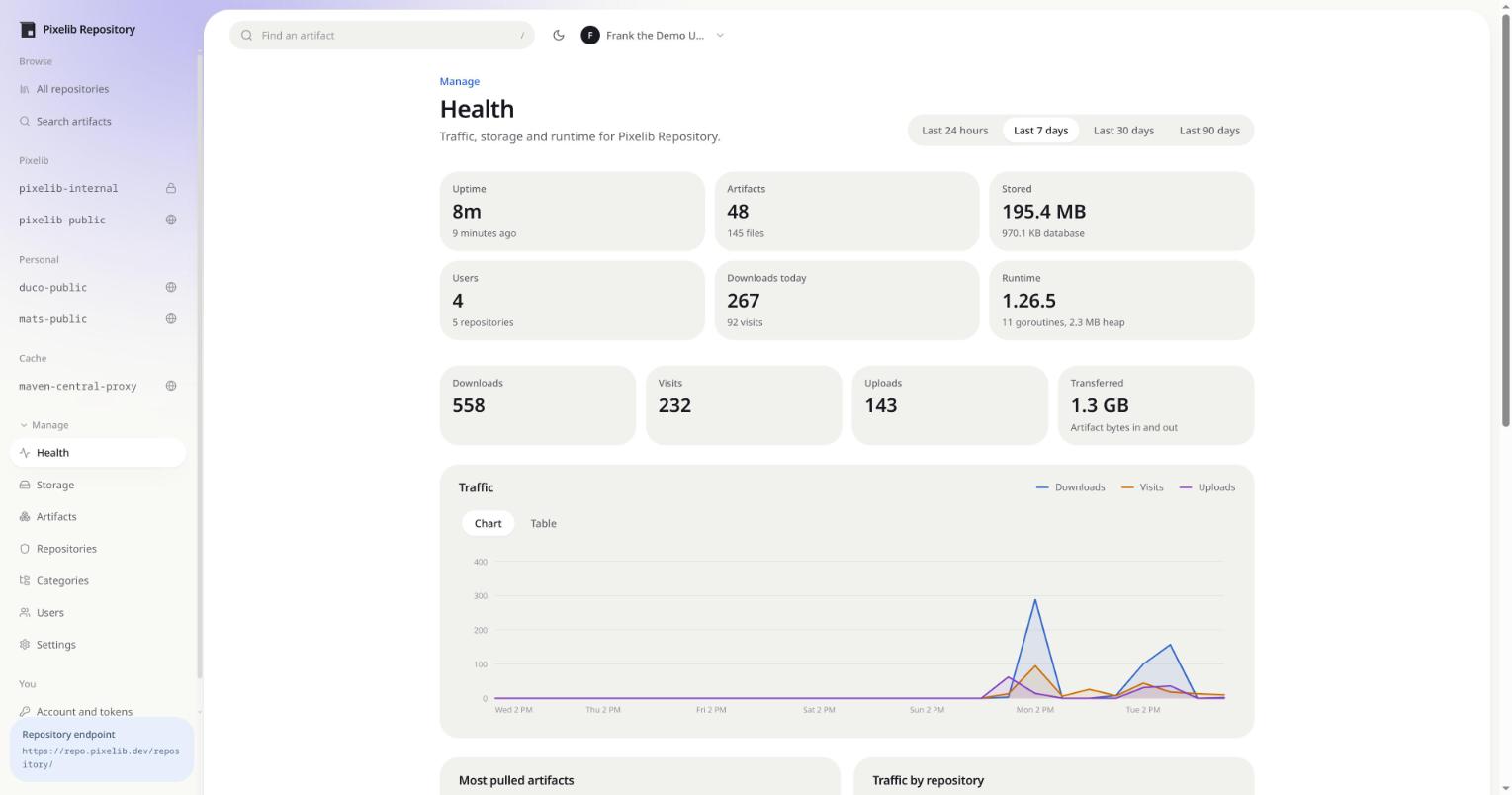
Traffic is recorded per request and rolled up over the window you pick. Downloads, uploads and visits are counted separately, so a spike in visits from a crawler does not look like build traffic.
The runtime numbers next to them are the Go process: uptime, goroutines and heap. They are the quickest way to tell a busy instance from a stuck one.
Storage
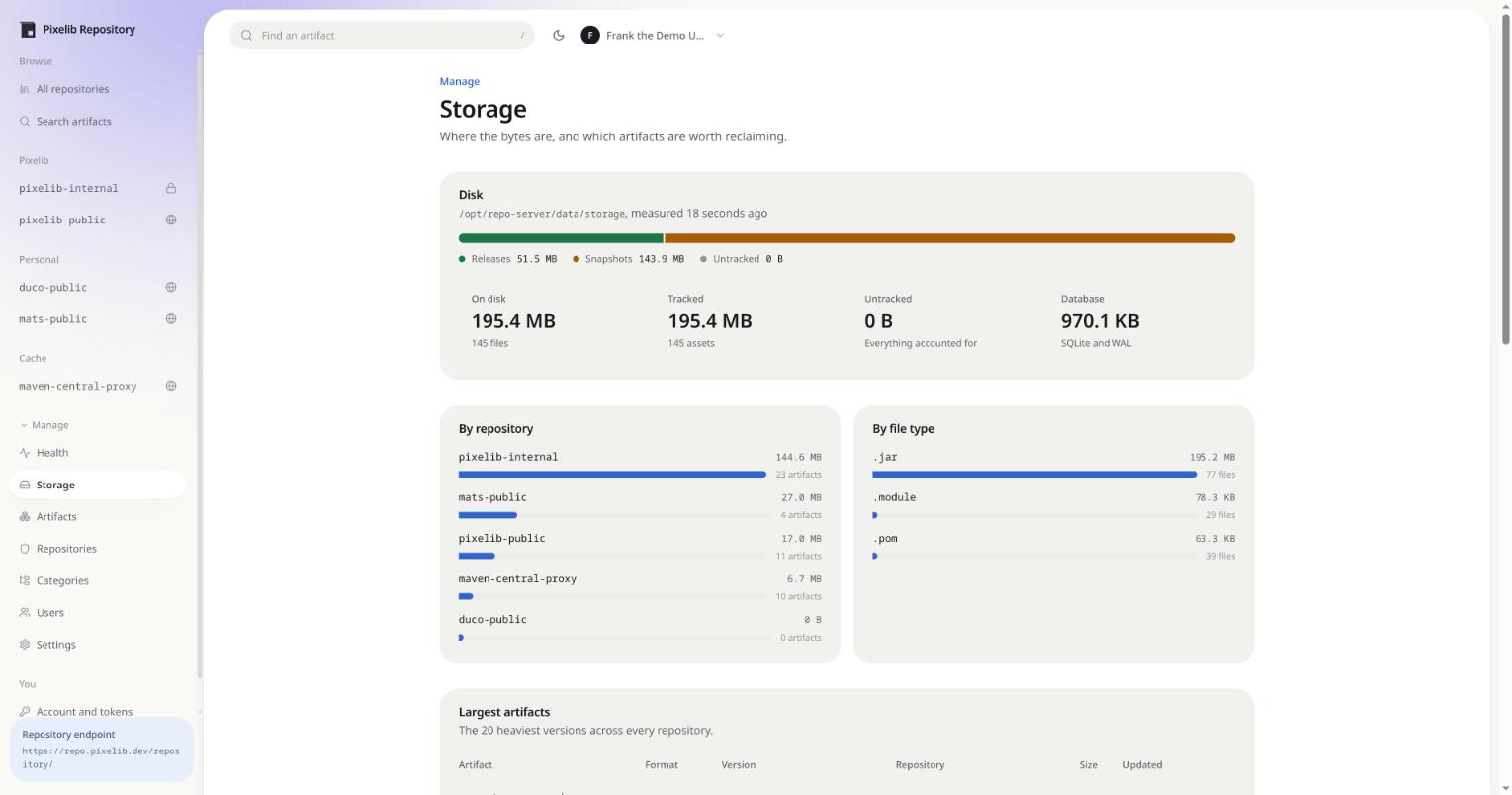
Storage is broken down by repository, by file type and by the heaviest individual versions, with releases and snapshots split out.
Untracked is the number to watch. It is bytes on disk that no database row points at, which should be zero. Anything else means files were left behind, usually by an interrupted delete.
Deleting artifacts
Artifacts are deleted from the artifact page, from the Artifacts screen under Manage, or over the API. A delete removes the files from disk and the rows from the database, and the component row goes with them once no files are left under that version.
Deleting from a proxy only drops the cached copy. The next request fetches it again.
Backups
Copy the storage directory and the SQLite database. Stop the process first, or use sqlite3 .backup
so the database is copied consistently while it is running. Copying a live database file with cp
can capture a torn write.