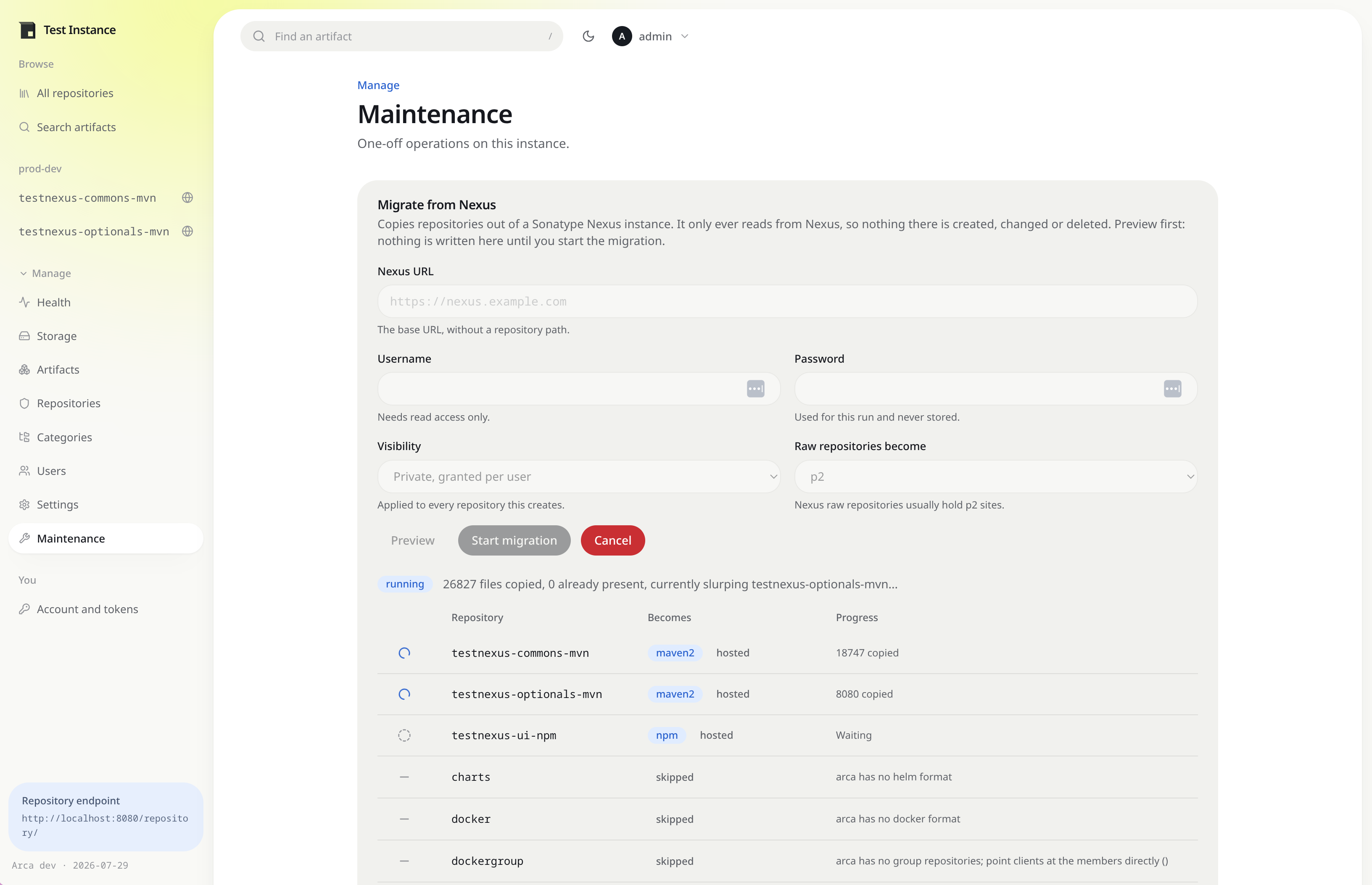
Migrating from Nexus
Arca reads a Sonatype Nexus 3 instance and reproduces its repositories here. It only ever sends GET
requests to Nexus: there is no code path that can create, change or delete anything there, so it is
safe to point at production.
The migration lives on the Maintenance page under Manage, and needs an administrator account.
What you need
A Nexus account with read access to repository definitions and content. It needs no write permission of any kind, so the safest thing to hand it is a read-only role.
You do not need an API token. The migration writes straight into this instance rather than calling back into its own API.
Look before you leap
Fill in the Nexus URL, the account to read it with, and press Preview. Nothing is written on either side. Arca lists every repository it found and what it intends to do with each one:
| Repository | Becomes | Notes |
|---|---|---|
maven-central |
maven2 proxy | Recreated pointing at the same upstream, cache not copied |
maven-releases |
maven2 hosted | Assets are copied across |
p2-releases |
p2 hosted | Assets are copied across |
docker-hosted |
docker hosted | Images are copied across, with their tags |
maven-public |
skipped | groups are not migrated; recreate it as a p2 group, or point clients at the members directly (maven-central, maven-releases) |
gems |
skipped | arca has no rubygems format |
The password is used for that run and never stored.
Running it
Start migration becomes available once you have previewed. The run continues in the background, so you can leave the page: the progress table shows each repository moving from waiting to done, with a running count of files copied, files already present, and failures. Cancel stops it.
Only one migration runs at a time.
How each repository is treated
| Nexus | Becomes |
|---|---|
maven2 hosted |
a hosted maven2 repository, every asset copied |
maven2 proxy |
a proxy pointing at the same upstream, cache not copied |
npm hosted or proxy |
the same, as npm |
docker hosted |
a hosted docker repository, every image and tag copied |
docker proxy |
a proxy pointing at the same registry, cache not copied |
raw |
a p2 repository, every asset copied |
| group | skipped |
| any other format | skipped |
A proxy holds nothing that cannot be fetched again, so copying its cache would be a slow way to move files you already have upstream. The recreated proxy refills itself on first use.
Nexus raw repositories become p2 because that is what they usually hold: Nexus 3 dropped the p2
format, so a p2 site published to Nexus lives in a raw repository. A p2 repository here stores
whatever paths you publish to it, so it serves those sites unchanged. Change Raw repositories
become if one of yours holds something else.
A Maven repository’s version policy carries across, so a SNAPSHOT repository in Nexus arrives as a
snapshot repository here.
Docker repositories
A docker repository takes an extra step, because Nexus exposes it through two listings that do not overlap. Its asset list holds the blobs and the manifests addressed by digest, and names no tag at all; the tags are only in its component list. A copy that read one and not the other would transfer every byte of every image and leave none of them pullable, so both are walked.
Nexus files blobs on one shared path regardless of which image used them, and addresses everything
under a v2/ prefix, so paths are translated on the way in:
| Nexus | Becomes |
|---|---|
v2/-/blobs/sha256:... |
the shared blob store |
v2/<image>/blobs/sha256:... |
the same store, since a digest names the same bytes |
v2/<image>/manifests/sha256:... |
the manifest, addressed by digest |
v2/<image>/manifests/<tag> |
the tag |
Anything else under v2/ has no place here and is counted as such in the progress line, rather than
stored somewhere nothing would read it back from. v2/<image>/tags/list is the usual one.
Once a repository’s content is all in place, every manifest is read and indexed. That has to wait until the end: a manifest’s platform and labels come from a config blob, and the copy order gives no guarantee of having fetched it yet. If a run is interrupted, Rebuild metadata under Manage, Maintenance finishes the job without recopying anything.
Docker repositories arrive with a mixed policy. Docker tags carry arbitrary suffixes, and a real
one like 0.1.9-swaggerui-staging is neither a release nor a prerelease by any rule worth writing.
Nexus serves docker on its own port through a connector. Arca does not need one: the repository name is the first segment of the image, so every repository is reachable on the same port the UI is. The connector settings are not read, and on some Nexus versions the REST API withholds them anyway.
Names are lowercased, because arca repository names are. A Nexus name that is still not valid after that is skipped and left for you to create by hand.
Groups
Group repositories are not migrated. Which members a group should carry is a decision worth making deliberately rather than inheriting, and arca only has groups for p2. The preview names the members of every group it skipped, so you can either point clients at those directly or, for p2, rebuild it as a group repository afterwards.
Some Nexus versions withhold a group’s members from the REST API. The preview says so rather than reporting an empty list, since a group with no members and a group whose members could not be read are very different things.
Interruptions
Start it again. Repositories that already exist are reported as such, and assets already present are skipped after one lookup, so a rerun transfers only what is missing. That makes it safe to cancel a long migration, or to run it once to move the bulk and again later to catch up.
It also means the migration will not reconfigure a repository you have already set up by hand. It fills that repository with the Nexus content but leaves its settings alone. If you want the Nexus settings instead, delete yours first and run it again.
If it reports no repositories
Nexus answers the repository list with an empty array rather than an error when the account cannot read repository definitions, so an unauthenticated run looks like an empty instance. Arca says so explicitly. Check the username and its privileges.
Once it is done
Point your builds at the new URLs. A repository keeps its name, so
https://nexus.example.com/repository/p2-releases/... becomes
https://repo.example.com/repository/p2-releases/... with the path after it unchanged.