
The Script API
Every script has a global Script object. It is your handle on the runtime: loading Java classes, pulling
in libraries, and hooking into your own lifecycle.
| Method | Purpose |
|---|---|
Script.loadClass(className) |
Load a Java class by fully qualified name |
Script.addUnloadCallback(callback) |
Run cleanup before this script unloads |
Script.getCaller() |
Get the Script object of whoever called into you |
Script.loadLibrary(relativeJarPath) |
Add a local jar to the runtime classpath |
Script.getRelativeFile(relativePath) |
Resolve a file relative to this script’s location |
Script.loadGradleDependency(coordinate) |
Download a Maven artifact and add it to the classpath |
Script.measure(name, callback) |
Time a block of code and expose it in the profiler |
Script.loadClass(className: string): any
Loads a Java class by its fully qualified name and gives you the JavaScript representation of it. Results are cached per file, so repeated calls are cheap.
The returned value behaves like a native JS class: call the constructor, read static fields, call static methods.
const ArrayList = Script.loadClass('java.util.ArrayList');
const list = new ArrayList();
list.add('Hello, PixelScript!');
console.log(list.size()); // 1

const System = Script.loadClass('java.lang.System');
const serverType = System.getenv('SERVER_TYPE');

// Enums work exactly as you would expect
const DayOfWeek = Script.loadClass('java.time.DayOfWeek');
console.log(DayOfWeek.MONDAY); // MONDAY
Convention is to load classes once at the top of the file and keep them in a const:
const MiniMessage = Script.loadClass('net.kyori.adventure.text.minimessage.MiniMessage');
const Component = Script.loadClass('net.kyori.adventure.text.Component');
const MM = MiniMessage.miniMessage();

export function mm(message) {
  return MM.deserialize(message);
}
Getting the raw Class object
Some Java APIs want a java.lang.Class rather than the type itself. Use .class:
const ArchModule = Script.loadClass('dev.pixelib.pp.core.arch.ArchModule').class;
PPPlugin.getInstance().getModule(ArchModule);
Implementing interfaces inline
Any Java interface loaded this way can be implemented by calling it as a constructor with an object literal. The runtime generates a real class at runtime that Java code can hold on to.
const MyListener = Script.loadClass('com.example.myscheduler.api.MyListener');

const listenerImpl = new MyListener({
  onEvent(event) {
    console.log(`Event received: ${event}`);
  }
});

MySchedulerApi.registerListener(listenerImpl);
Functional interfaces such as Runnable and Consumer are converted automatically, so a plain arrow
function is enough:
MySchedulerApi.scheduleTask((currentTime) => {
  console.log(`Current time is: ${currentTime}`);
}, 1000);
More on this, including abstract classes, in Interfaces and abstract classes. If you need Java to call into JS through a stable, type-safe handle, see Implementing Java interfaces instead.
Types follow automatically
Whenever a script loads a Java class the runtime has not seen before, definitions.d.ts is regenerated to
include it. Your IDE picks it up on the next reload and starts autocompleting the real API.
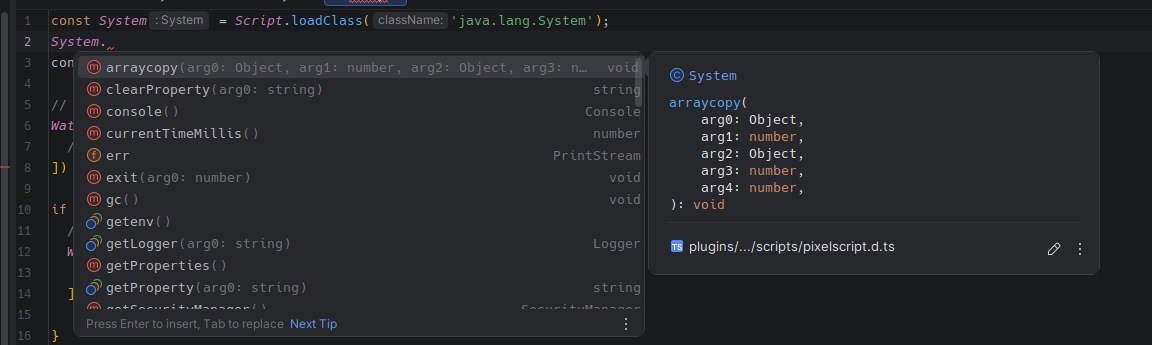
For simple name lookups without the fully qualified string, see magic imports.
Script.addUnloadCallback(callback: () => void): void
Registers a function to run just before this script is unloaded. This fires on reload, on a parent unloading, and on server shutdown.
Use it for anything the runtime cannot clean up for you: despawning entities, removing boss bars, closing inventories, cancelling external subscriptions.
const BossBar = Bukkit.createBossBar('Welcome!', $.BarColor.BLUE, $.BarStyle.SEGMENTED_6);

registerListener($.PlayerJoinEvent, (event) => {
  BossBar.addPlayer(event.getPlayer());
});

// Without this, a reload leaves an orphaned boss bar on every player's screen
Script.addUnloadCallback(() => {
  BossBar.removeAll();
  BossBar.setVisible(false);
});
You do not need to clean up commands, event listeners, or scheduler tasks. Those are unregistered automatically. See Commands, Events and Scheduler.
Script.getCaller(): Script
Returns the Script object of the script that called into the current one. This lets a shared utility
register cleanup in its caller’s lifecycle rather than its own, which matters because a utility module
outlives any single importer.
// utils/entities.js
export function makeHologram(location, text) {
  const entity = spawnDisplay(location, text);

  // Tie the entity to whoever asked for it, not to this module
  Script.getCaller().addUnloadCallback(() => entity.remove());

  return entity;
}
Throws if the calling script has multiple instances (which happens with
.isolate.js modules), because the caller is then ambiguous. Pass the
Script object explicitly in that case.
Script.loadLibrary(relativeJarPath: string): void
Loads a jar sitting next to your script into the runtime classpath. The path is relative to the current script file. The jar is loaded once no matter how many scripts ask for it, and dropped again when they all unload.
Script.loadLibrary('./uni-dialog-core-1.5.0.jar');
Script.loadLibrary('./uni-dialog-paper-1.5.0.jar');
Script.loadLibrary('./uni-dialog-adventure-1.5.0.jar');

export const Dialog = Script.loadClass('io.github.projectunified.unidialog.core.dialog.Dialog');
dialogue/
├── dialog.js
├── uni-dialog-adventure-1.5.0.jar
├── uni-dialog-core-1.5.0.jar
└── uni-dialog-paper-1.5.0.jar
Classes from a loaded library are added to the type generator too, so they show up in your IDE.
Script.getRelativeFile(relativePath: string): java.io.File
Resolves a path relative to the current script file to an absolute java.io.File. Useful when a script
reads or writes files that live next to it, without hardcoding the plugin path.
const Files = Script.loadClass('java.nio.file.Files');
const configFile = Script.getRelativeFile('./config.json');
const config = JSON.parse(Files.readString(configFile.toPath()));
The file must already exist and be a regular file, not a folder (getRelativeFile throws otherwise). The
returned java.io.File can be handed to any Java API that wants one.
Script.loadGradleDependency(coordinate: string): void
Same idea, but resolved from Maven Central instead of a local file. Takes a Gradle-style coordinate and
caches the download in plugins/PixelScript/maven_cache, so it is only fetched once.
Script.loadGradleDependency('com.saicone:rtag:1.5.16');
Script.loadGradleDependency('com.saicone:rtag-item:1.5.16');

const RtagItem = Script.loadClass('com.saicone.rtag.RtagItem');
Call it at the top of the module that needs it, before the matching loadClass calls. Transitive
dependencies are not resolved, so list every artifact you need explicitly.
Script.measure(name: string, callback: () => void): void
Runs a callback and records how long it took under name in this script’s profiler. Useful for finding
the expensive part of a feature.
Script.measure('rebuild-scoreboard', () => {
  Bukkit.getOnlinePlayers().forEach(updateScoreboard);
});
Read the results with /script info <file>. See Performance profiling.
Exceptions thrown inside the callback are caught and logged rather than propagated, so measure never
changes your control flow.